
Receipt Booth app
The receipt photo booth app
Guests tap, smile and take a photo. The app prints it on receipt paper or a sticker. You design how it looks.


-
IncludedWith every booth
-
Samsung tabletIn the box
-
Receipt or stickerFrom one printer
-
Plug and playOpen and print
Features
One app for the photo and the print
-
Photo and print in one app
Guests take the photo and the booth prints it. No laptop, no extra software.
-
Your own template
Add text and images to the receipt layout, or design it in Canva and upload it.
-
Your own screens
Customise the camera and photo review screens to match your event or shop.
-
Receipt or sticker
Print on receipt paper or sticker paper from the same booth.
-
Reprints for guests
Let guests print extra copies after the first.
-
Print controls
Adjust brightness (up to 200%), image smoothing and sound effects.
Up and running in four steps
-

Set up the booth
Connect the tablet, plug in the power cable, slide the tablet in. Everything you need is in the box.
-

Open the app
Download Receipt Booth from the Play Store using a Google account. The app starts automatically once the printer is on.
-

Make it yours
Choose a theme, edit the print template and set the countdown.
-

Start the photo booth
Hand it over to your guests. They take the photo and it prints.


Your screens
Your event, on every screen
Customise the camera and photo review screens to match your event or shop. Save, rename and sort your themes in My Themes, or start from the Theme Library supplied by Receipt Booth.
Template editor
Design the print. Design the screen.
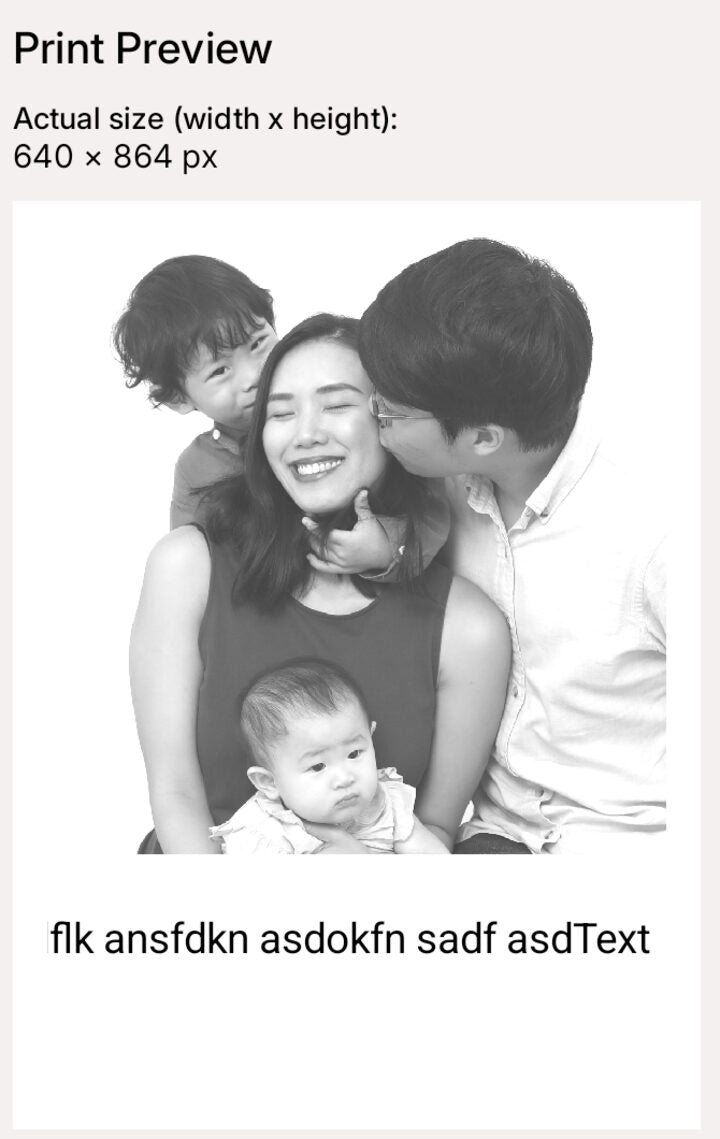
Open Print Customisation, tap Edit print template, and lay out the receipt for each theme. Add text and images, drag them into place, undo and redo, zoom in, and send a test print when it looks right.
- Add image and add text layers
- Choose the receipt size
- Each theme keeps its own print design
- Prefer a computer? Design in Canva, share the PNG to the tablet and set it as the background layer.
Printing
Prints on receipt paper or sticker paper
The app drives the booth's 2-in-1 printer. Choose how photos are processed before they print.
- Brightness control up to 200%
- Image smoothing styles, including Sierra Lite, for cleaner mid-tones and darker areas
- Live print preview and test print
- Print quality improvements for darker areas (v1.0.3)
About 200 to 400 prints per roll depending on layout. Receipt paper S$20, sticker paper S$30. Shop paper refills
At real events
Tag @receiptbooth


Built for a busy event
Guests often want a second copy. Turn on Reprint photos and they can print extra copies after the first. Set an automatic timeout so the dialog closes itself if nobody taps it.
- Auto-dismiss on the extra-copies screen
- The review screen shows the original, unedited photo
- Keep the tablet charging while it prints, so it does not run out of battery during the event
- Test print from the Printer screen before doors open
In action
See it at an event
A Receipt Booth on a table: guests take a photo and leave with the print in hand.
What you need
Everything is in the box. Add a Google account.
- A Receipt Booth, with the Samsung tablet, printer and cables included
- A Google account, to download the app from the Play Store
- Paper: starter receipt and sticker rolls are in the box (2 rolls)
- Power: plug and play, 100 to 240V, with US, UK, EU or AU plugs
The app is only compatible with Receipt Booth printers and tablets. The 6-month warranty covers the booth and printer, not the Samsung tablet.
The app at a glance
| Included | With every Receipt Booth |
|---|---|
| Runs on | The Samsung tablet in the box |
| Install | Google Play, with a Google account |
| Works with | Receipt Booth printers and tablets only |
| Version | 1.0.5 |
| Brightness | Up to 200% |
Buy or rent, the app is there
| Buy | Rent in Singapore | |
|---|---|---|
| Receipt Booth app | Included | Included |
| Tablet and printer | Included | Included |
| Price | S$1,590 | S$400 per event day |
App questions
What does the Receipt Booth app do?
It runs the photo booth: guests take a photo, and the app prints it on receipt paper or sticker paper. You customise the camera screens and the print template.
Is the app included with the booth?
Yes. The Receipt Booth app is in the box with every booth, on the Samsung tablet. You download it from the Play Store with a Google account.
Can I use it on other tablets or printers?
No. The app is only compatible with Receipt Booth printers and tablets.
Can I design my own print template, with my logo?
Yes. Use the template editor in the app to add text and images, or design in Canva and upload the PNG. Each theme has its own print design.
Can guests print more than one copy?
Yes. Turn on Reprint photos in Booth Customisation. You can set the dialog to close automatically.
Why are there lines on my prints?
Horizontal lines usually come from a dim room. Move the booth somewhere brighter or raise Brightness Control in Print Customisation (up to 200%). Vertical lines can mean a printer head fault: contact us at receiptbooth@gmail.com.
Why does the app say No Printers Found?
Check that the printer is powered on, the USB data cable runs from the printer to the tablet connector, and the tablet is charging through the tablet connector.
Ready to run your own receipt photo booth?
The app is included. The booth is S$1,590, made in Singapore, with a 6-month warranty.